Multi-Tenant Architecture
Scaling Onyx for Multiple Organizations
🏢 Understanding Multi-Tenancy in Onyx
Multi-tenancy allows a single Onyx instance to serve multiple organizations (tenants) while keeping their data completely isolated. This architecture is perfect for SaaS deployments where each customer needs their own secure knowledge base.
💰 Cost Efficiency
Share infrastructure costs across multiple tenants while maintaining isolation
🔐 Data Security
Complete data isolation between tenants at database and application level
⚡ Easy Management
Centralized admin portal for managing all tenants from one place
Multi-Tenant Architecture Overview
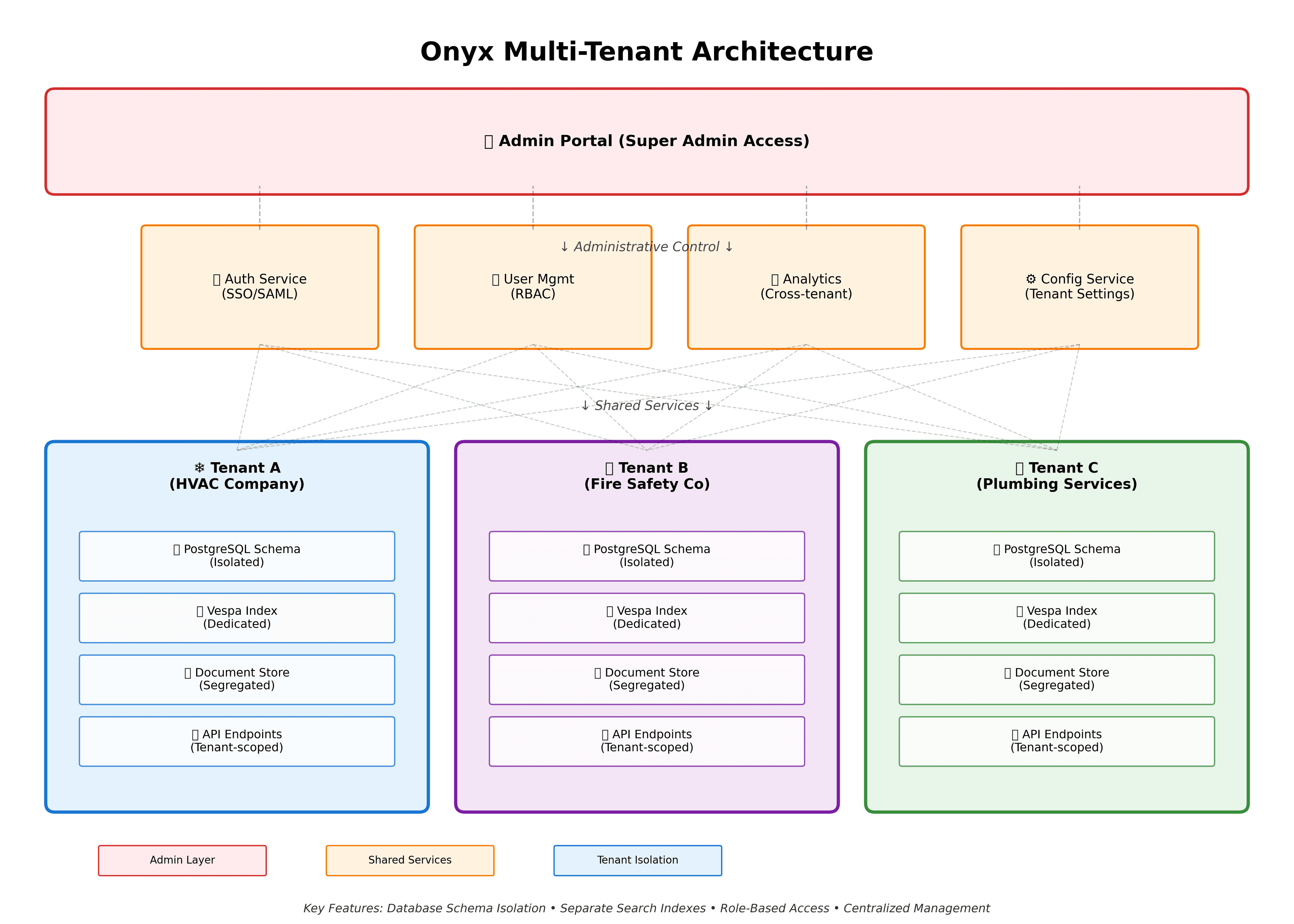
🔐 Admin Portal (Super Admin Layer)
The top-level administrative interface that provides complete control over all tenants:
- •Create and manage tenant accounts
- •Monitor resource usage per tenant
- •Configure tenant-specific limits
- •View cross-tenant analytics
- •Manage billing and subscriptions
- •Deploy updates and patches
🔧 Shared Services Layer
Core services that are shared across all tenants but maintain logical separation:
🔑 Auth Service
SSO/SAML integration with tenant-specific identity providers
👥 User Management
Role-based access control (RBAC) scoped to each tenant
📊 Analytics Engine
Tenant-isolated metrics with optional cross-tenant insights
⚙️ Config Service
Tenant-specific settings and customizations
🏢 Tenant Isolation Strategy
Each tenant operates in complete isolation with dedicated resources:
❄️ Tenant A: HVAC Company
- • Technical manuals for HVAC systems
- • Service procedures & troubleshooting
- • Customer equipment databases
🔥 Tenant B: Fire Safety Co
- • Fire suppression system docs
- • Compliance regulations
- • Inspection checklists
🚰 Tenant C: Plumbing Services
- • Plumbing codes & standards
- • Equipment specifications
- • Installation guides
Each Tenant Gets:
🗄️ PostgreSQL Schema
Dedicated database schema with row-level security. Complete data isolation at the database level.
🔍 Vespa Search Index
Separate search index for each tenant. No cross-tenant search contamination.
📁 Document Store
Isolated file storage with tenant-specific encryption keys.
🔌 API Endpoints
Tenant-scoped API routes with automatic tenant context injection.
🛠️ How Multi-Tenancy Can Be Implemented
1. Database Schema Isolation
-- Example: Create tenant-specific schema
CREATE SCHEMA tenant_abc;

-- Set search path for tenant sessions
SET search_path TO tenant_abc, public;

-- Row-level security policies
ALTER TABLE documents ENABLE ROW LEVEL SECURITY;
CREATE POLICY tenant_isolation ON documents
  FOR ALL USING (tenant_id = current_setting('app.tenant_id'));
2. API Middleware for Tenant Context
# FastAPI middleware example
@app.middleware("http")
async def inject_tenant_context(request: Request, call_next):
    tenant_id = extract_tenant_from_subdomain(request.url)
    # or extract from JWT token

    request.state.tenant_id = tenant_id
    response = await call_next(request)
    return response
3. Vespa Index Separation
# Configure separate Vespa application per tenant
vespa deploy --tenant tenant-abc --application-id onyx-abc

# Or use namespace isolation within single Vespa cluster
document.namespace = "tenant_abc"
✨ Multi-Tenant Best Practices
Do's ✅
- ✓Use subdomain routing (tenant1.onyx.com)
- ✓Implement tenant-aware caching strategies
- ✓Monitor resource usage per tenant
- ✓Regular security audits for isolation
Don'ts ❌
- ✗Share database connections across tenants
- ✗Use tenant ID in URLs (security risk)
- ✗Mix tenant data in shared caches
- ✗Forget to test tenant isolation