You already have a REST API. Here's how to add MCP so AI agents (and your CLI) consume it natively.
Most write-ups about MCP are abstract — “it's a protocol, here are the spec docs.” This page is concrete. We'll take a real-world example (subscription status), show the existing REST endpoint, wrap it as an MCP server, demonstrate how a Claude-powered agent consumes it, and build a CLI that uses the same MCP server under the hood. One source of truth, three access surfaces.
📊The picture, before the prose
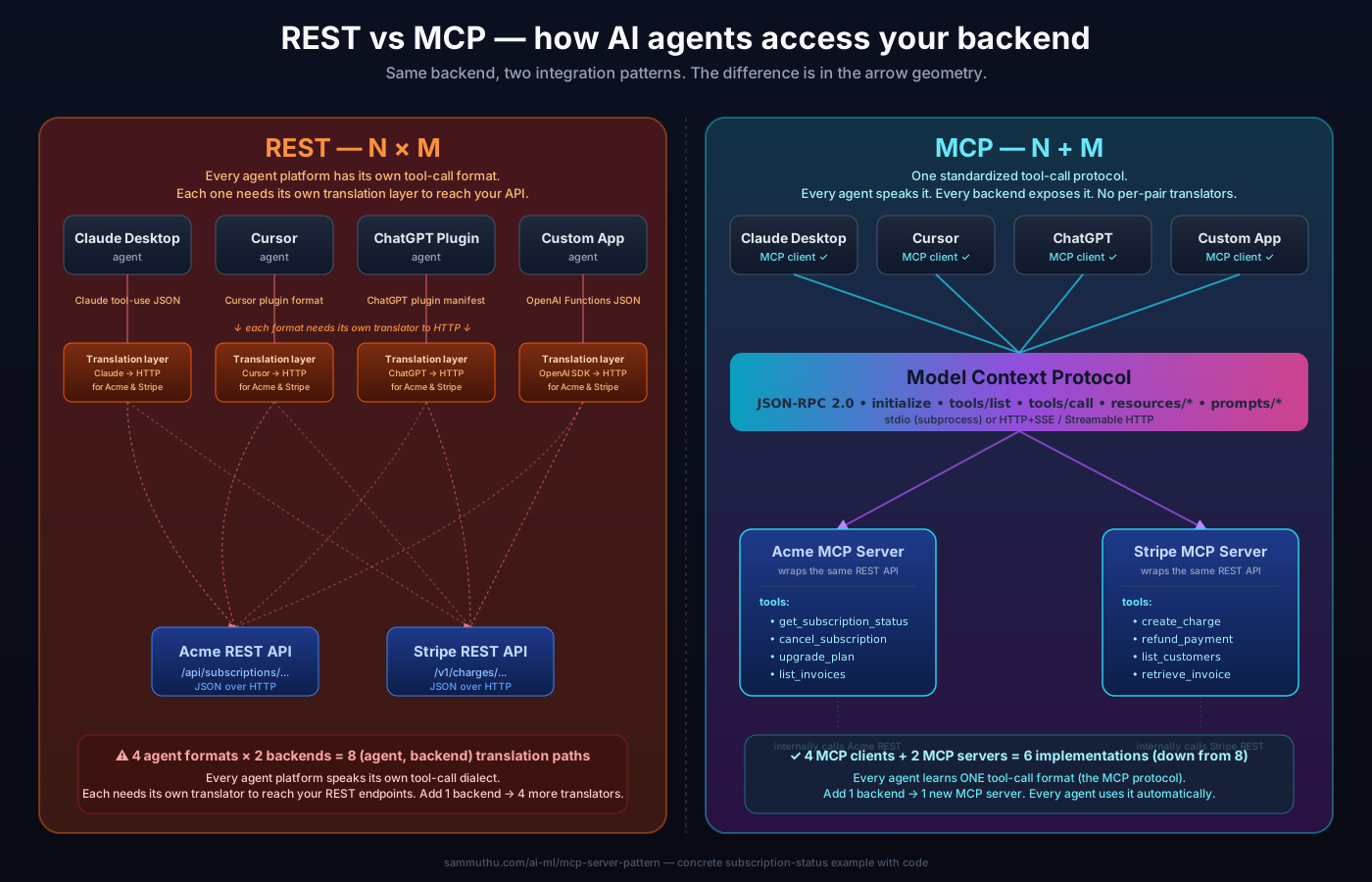
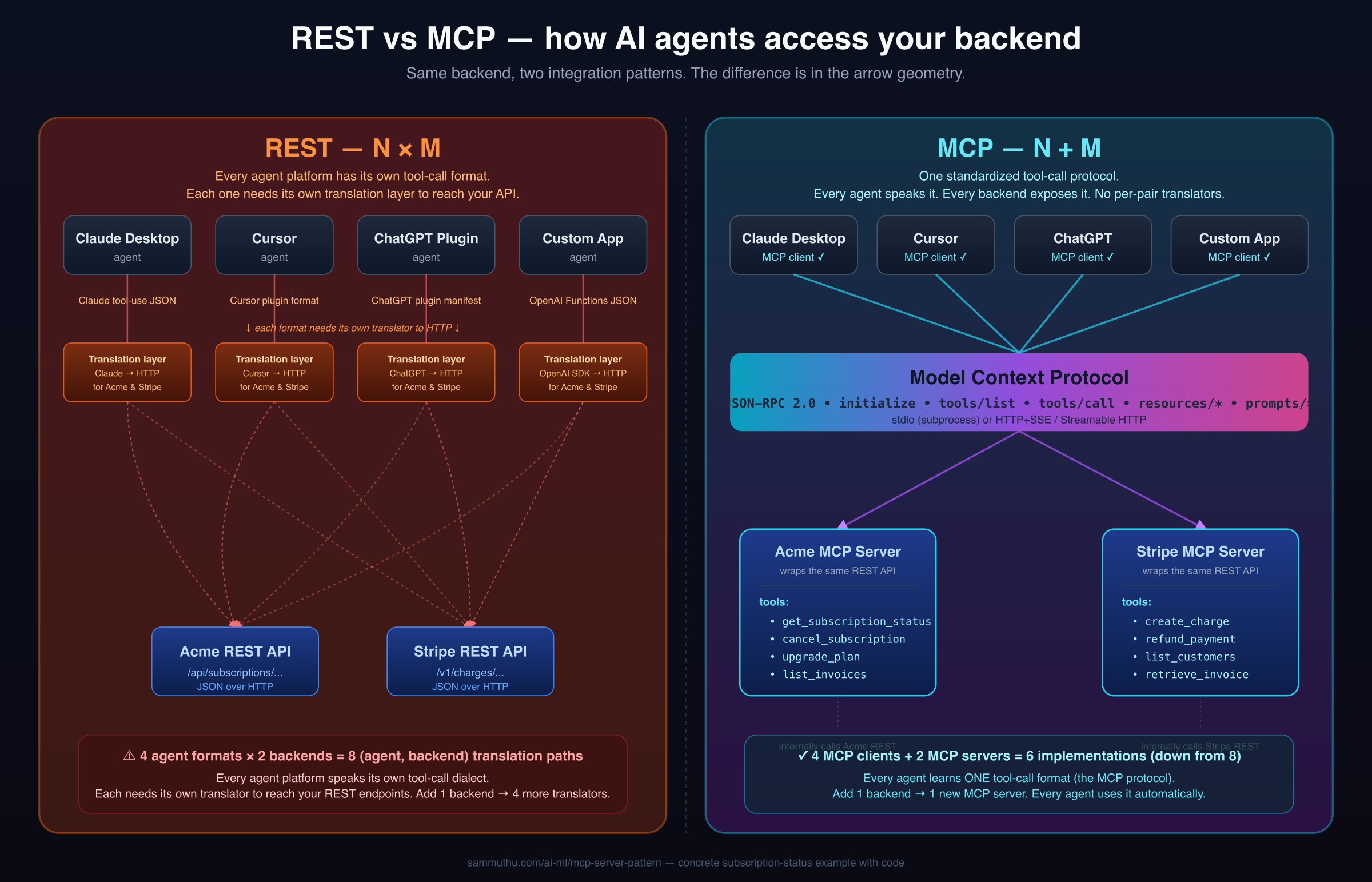
If you already know REST and you're wondering what MCP is, this diagram is the whole story. Same backend on both sides — what changes is the integration shape between the AI agents on top and your service on the bottom.
Download: PNG (for LinkedIn / Slack / docs) · SVG (vector, scales)
🤔"Wait — I built ONE REST API. Where does N×M come from?"
Fair question. If you're a developer, you call your own REST API with curl, with fetch, with requests, with axios — one API, every HTTP client knows how to talk to it. That's been true for 25 years. For human developers, REST is one wrapper.
But AI agents can't “just call REST.” That's the source of the surprise.
Modern AI agents don't fire HTTP requests by themselves. They invoke tools — named functions with structured input schemas that the LLM has been shown ahead of time. The LLM picks a tool, fills in the arguments, and the agent runtime executes it.
For your REST API to be callable from an AI agent, someone has to write a translation layer:
- Declare your endpoints as tools in the agent platform's specific tool format
- Map LLM tool-calls → HTTP requests to your API
- Map HTTP responses → LLM-readable tool results
- Handle auth, errors, retries — in the way that platform expects
Here's the kicker: every AI agent platform has its own tool-call format. There is no shared standard. Claude Desktop's tool schema looks different from Cursor's plugin manifest, which looks different from ChatGPT's plugin format, which looks different from the Anthropic SDK's tool-use JSON, which looks different from the OpenAI Functions schema. They all do the same conceptual thing (give the LLM a function to call), but the wire formats, auth flows, and runtime expectations diverge.
So for Acme to make their subscription API accessible from all four agent platforms, four different engineering teams (or one team, four times) write four different translation layers — all pointing at the same Acme REST endpoints underneath. And if Acme adds Stripe-style billing later, four MORE translation layers. That's the N×M: N agent platforms × M backends = N×M translation layers, because no two agents speak the same tool-call language.
Every agent that supports MCP learns ONE tool-call format (MCP's JSON-RPC envelope: tools/list, tools/call). Every backend that wants to be agent-callable exposes ONE MCP server. The translation layer becomes a shared protocol instead of per-agent bespoke code. The 4 agents now reach the 2 backends through that shared layer — 4 + 2 = 6 implementations total instead of 4 × 2 = 8.
REST didn't go away. The MCP server still calls your REST API under the hood. MCP is additive — it puts a thin standardized protocol layer between agents and your existing HTTP endpoints. You don't rewrite REST; you add MCP alongside it.
🎯The scenario — Acme SaaS subscription system
Acme SaaS has a subscription product (think Spotify / Netflix / GitHub Pro — universal mental model). They've had a REST API for years. It works. Three personas use it:
REST API
MCP Server
CLI
Without MCP, Acme's engineering team would build N custom integrations: one for ChatGPT's plugin format, one for Claude Desktop's tool schema, one for Cursor, one for the next agent that ships next month. With MCP, they build ONE server and any MCP-compatible client (now and future) works out of the box. The CLI consuming the same MCP server is a bonus — keeps tool logic in one place across both AI and human surfaces.
🌐Surface 1 — the REST API (what already exists)
Acme's existing endpoint. Nothing fancy — a typical Express handler over a Postgres table.
import express from 'express'
const app = express()

app.get('/api/subscriptions/:userId', async (req, res) => {
  const sub = await db.subscriptions.findOne({
    user_id: req.params.userId
  })
  if (!sub) return res.status(404).json({ error: 'No subscription found' })
  res.json({
    user_id: sub.user_id,
    plan: sub.plan,                  // 'free' | 'pro' | 'enterprise'
    status: sub.status,              // 'active' | 'past_due' | 'canceled'
    renews_at: sub.renews_at,        // ISO date
    monthly_price_usd: sub.monthly_price_usd
  })
})

app.post('/api/subscriptions/:userId/cancel', async (req, res) => {
  await db.subscriptions.update(
    { user_id: req.params.userId },
    { status: 'canceled', canceled_at: new Date() }
  )
  res.json({ ok: true })
})A developer calls it directly:
curl https://api.acme.com/api/subscriptions/u-1234
# {"user_id":"u-1234","plan":"pro","status":"active","renews_at":"2026-06-15","monthly_price_usd":29}
That's our baseline. Every Acme customer's subscription state is one HTTP call away. The REST surface stays exactly as-is. We're going to add MCP alongside it, not replace it.
🤖Surface 2 — the MCP server (wraps the same logic)
An MCP server is just a process that speaks JSON-RPC 2.0. The official SDK does the protocol handshake for you — you write the tool definitions and the tool execution. Here's the whole thing for the subscription example:
import { Server } from '@modelcontextprotocol/sdk/server/index.js'
import { StdioServerTransport } from '@modelcontextprotocol/sdk/server/stdio.js'
import {
  CallToolRequestSchema,
  ListToolsRequestSchema
} from '@modelcontextprotocol/sdk/types.js'

const ACME_API = 'https://api.acme.com'

const server = new Server(
  { name: 'acme-subscriptions', version: '1.0.0' },
  { capabilities: { tools: {} } }
)

// ─── Tool discovery — agents call this to see what's available ───
server.setRequestHandler(ListToolsRequestSchema, async () => ({
  tools: [
    {
      name: 'get_subscription_status',
      description:
        'Get the current subscription status for a user — plan, status, renewal date, monthly price. Use this when the user asks about their account, billing, or subscription tier.',
      inputSchema: {
        type: 'object',
        properties: {
          user_id: {
            type: 'string',
            description: 'The unique user identifier (e.g., "u-1234")'
          }
        },
        required: ['user_id']
      }
    },
    {
      name: 'cancel_subscription',
      description: 'Cancel a user subscription immediately. Use with caution — this is destructive.',
      inputSchema: {
        type: 'object',
        properties: {
          user_id: { type: 'string', description: 'The user identifier' }
        },
        required: ['user_id']
      }
    }
  ]
}))

// ─── Tool execution — agents call this to invoke a tool ───
server.setRequestHandler(CallToolRequestSchema, async (request) => {
  const { name, arguments: args } = request.params

  if (name === 'get_subscription_status') {
    const { user_id } = args as { user_id: string }
    const sub = await fetch(`${ACME_API}/api/subscriptions/${user_id}`).then(r => r.json())
    return {
      content: [{ type: 'text', text: JSON.stringify(sub, null, 2) }]
    }
  }

  if (name === 'cancel_subscription') {
    const { user_id } = args as { user_id: string }
    await fetch(`${ACME_API}/api/subscriptions/${user_id}/cancel`, { method: 'POST' })
    return {
      content: [{ type: 'text', text: `Subscription canceled for ${user_id}` }]
    }
  }

  throw new Error(`Unknown tool: ${name}`)
})

// ─── Boot the server over stdio ───
const transport = new StdioServerTransport()
await server.connect(transport)That's the entire MCP server — ~60 lines of TypeScript. Notice it doesn't reimplement the business logic — it calls back into the existing REST API. The MCP layer is a thin adapter.
When an MCP client connects to this server, the message exchange looks like this:
# 1. Client says hello, server responds with capabilities
→ {"jsonrpc":"2.0","id":1,"method":"initialize","params":{"protocolVersion":"2024-11-05",...}}
← {"jsonrpc":"2.0","id":1,"result":{"protocolVersion":"2024-11-05","capabilities":{"tools":{}}}}

# 2. Client asks what tools exist
→ {"jsonrpc":"2.0","id":2,"method":"tools/list"}
← {"jsonrpc":"2.0","id":2,"result":{"tools":[{"name":"get_subscription_status",...}]}}

# 3. Client invokes a tool
→ {"jsonrpc":"2.0","id":3,"method":"tools/call","params":{"name":"get_subscription_status","arguments":{"user_id":"u-1234"}}}
← {"jsonrpc":"2.0","id":3,"result":{"content":[{"type":"text","text":"{\"user_id\":\"u-1234\",\"plan\":\"pro\",...}"}]}}That's it. Three message types — initialize, tools/list, tools/call — and the protocol does its job. You never write JSON-RPC by hand; the SDK handles all of it.
🧠How an LLM agent consumes the MCP server
From the agent's point of view, MCP tools look exactly like any other tool in the Anthropic / OpenAI tool-use API. The MCP client SDK loads the tool schemas via tools/list and translates them into the format Claude expects.
A user asks Claude:
What's the current subscription tier for user u-1234, and how much are they paying us per month?Inside the agent loop (TypeScript):
import Anthropic from '@anthropic-ai/sdk'
import { Client } from '@modelcontextprotocol/sdk/client/index.js'
import { StdioClientTransport } from '@modelcontextprotocol/sdk/client/stdio.js'

const anthropic = new Anthropic()

// 1. Connect to the MCP server (spawns it as a subprocess)
const mcpTransport = new StdioClientTransport({
  command: 'node',
  args: ['./mcp-server/dist/index.js']
})
const mcp = new Client(
  { name: 'acme-agent', version: '1.0.0' },
  { capabilities: {} }
)
await mcp.connect(mcpTransport)

// 2. Get the tool schemas from MCP and convert to Anthropic's format
const { tools: mcpTools } = await mcp.listTools()
const anthropicTools = mcpTools.map(t => ({
  name: t.name,
  description: t.description,
  input_schema: t.inputSchema
}))

// 3. Run the Claude tool-use loop
let messages = [
  { role: 'user', content: "What's u-1234 paying us per month?" }
]

while (true) {
  const response = await anthropic.messages.create({
    model: 'claude-sonnet-4-5',
    max_tokens: 1024,
    tools: anthropicTools,
    messages
  })

  if (response.stop_reason === 'end_turn') {
    console.log(response.content[0].text)
    break
  }

  if (response.stop_reason === 'tool_use') {
    const toolUse = response.content.find(b => b.type === 'tool_use')

    // Call the MCP server to actually execute the tool
    const result = await mcp.callTool({
      name: toolUse.name,
      arguments: toolUse.input
    })

    // Feed the result back to Claude
    messages.push({ role: 'assistant', content: response.content })
    messages.push({
      role: 'user',
      content: [{
        type: 'tool_result',
        tool_use_id: toolUse.id,
        content: result.content[0].text
      }]
    })
  }
}Claude's final response to the user:
User u-1234 is on the "pro" plan, which is $29 per month. Their subscription
is currently active and renews on June 15, 2026.The above is what you write when you're building a custom Claude-powered app. If a user is in Claude Desktop, none of that code is needed. They just add the MCP server to their config:
{
  "mcpServers": {
    "acme-subscriptions": {
      "command": "node",
      "args": ["/path/to/acme-mcp-server/dist/index.js"]
    }
  }
}
Claude Desktop launches the MCP server, calls tools/list, and now Claude in the desktop app can answer questions about Acme subscriptions. Zero code on the user's side. This is the “N×M becomes N+M” payoff in practice.
⌨️Surface 3 — a CLI that uses the same MCP server
Power users live in the terminal. They want acme subscription status u-1234, not a web UI. Here's the clever part: the CLI can use the MCP server under the hood. Same tool definitions, same execution path, same source of truth.
The CLI from the user's perspective:
$ acme subscription status u-1234
plan:               pro
status:             active
renews_at:          2026-06-15
monthly_price_usd:  $29.00

$ acme subscription cancel u-1234
✓ Subscription canceled for u-1234
Inside the CLI (TypeScript with the MCP client SDK):
#!/usr/bin/env node
import { Command } from 'commander'
import { Client } from '@modelcontextprotocol/sdk/client/index.js'
import { StdioClientTransport } from '@modelcontextprotocol/sdk/client/stdio.js'

async function withMCPClient<T>(fn: (mcp: Client) => Promise<T>): Promise<T> {
  const transport = new StdioClientTransport({
    command: 'node',
    args: [`${process.env.HOME}/.acme/mcp-server/index.js`]
  })
  const mcp = new Client(
    { name: 'acme-cli', version: '1.0.0' },
    { capabilities: {} }
  )
  await mcp.connect(transport)
  try {
    return await fn(mcp)
  } finally {
    await mcp.close()
  }
}

const program = new Command()

program
  .command('subscription')
  .description('Subscription commands')

program.command('subscription status <userId>')
  .description('Show subscription status for a user')
  .action(async (userId) => {
    await withMCPClient(async (mcp) => {
      const result = await mcp.callTool({
        name: 'get_subscription_status',
        arguments: { user_id: userId }
      })
      const sub = JSON.parse(result.content[0].text)
      // Pretty-print for terminal
      console.log(`plan:              ${sub.plan}`)
      console.log(`status:            ${sub.status}`)
      console.log(`renews_at:         ${sub.renews_at}`)
      console.log(`monthly_price_usd: $${sub.monthly_price_usd}.00`)
    })
  })

program.command('subscription cancel <userId>')
  .action(async (userId) => {
    await withMCPClient(async (mcp) => {
      await mcp.callTool({
        name: 'cancel_subscription',
        arguments: { user_id: userId }
      })
      console.log(`✓ Subscription canceled for ${userId}`)
    })
  })

program.parse()Notice the CLI is doing the same thing Claude Desktop does — spawn the MCP server as a subprocess, call tools/call. There is only ONE implementation of “get the subscription for user X.” When Acme's engineering team fixes a bug in the subscription-fetch logic, both AI agents AND the CLI pick it up automatically. No drift between the agent surface and the human surface.
This is analogous to how gcloud CLI internally uses the same gRPC APIs that Google's own services use, or how kubectl uses the Kubernetes REST API that operators use. One source of truth, multiple surfaces.
🔢The N×M problem this pattern solves
Without MCP, every agent platform has to build a custom integration to every backend:
Without MCP (N agents × M backends = N×M integrations):

  Claude Desktop ─┬─ custom-integration-1 ─→ Acme
  Cursor ────────┼─ custom-integration-2 ─→ Acme
  ChatGPT plugin ┼─ custom-integration-3 ─→ Acme
  Continue.dev ──┴─ custom-integration-4 ─→ Acme
                   custom-integration-5 ─→ Stripe
                   custom-integration-6 ─→ Salesforce
                   ...
With MCP (N + M integrations): Claude Desktop ─┐ ┌─→ Acme MCP server Cursor ─────────┼──→ MCP protocol ──────┼─→ Stripe MCP server ChatGPT plugin ─┤ ├─→ Salesforce MCP server Continue.dev ───┘ └─→ ... Each agent implements MCP client once. Each backend exposes MCP server once. Total: N + M.
This is the exact pattern that made USB-C win over proprietary connectors, that made OAuth replace site-specific login, that made OpenAPI win over bespoke API doc formats. Standards work when there's a many-to-many relationship.
🛠️What I'd add for production
The example above is the minimum viable MCP server. For a production deployment serving real customers, here's what I'd add:
Auth
The current example assumes the MCP server has direct access to Acme's database. Production: accept OAuth tokens or API keys via MCP credential mechanism. Per-user scoping so tool calls are authorized for that user's data only.
Multi-tenant scoping
Same MCP server serves multiple Acme customer organizations. Tool calls must be scoped to the caller's tenant. Pattern: AsyncLocalStorage-based context so every database query auto-includes tenant_id.
Observability
Every tool call gets an OpenTelemetry span — duration, success/error, tokens consumed (if calling an LLM internally), user id. Pipe to whatever the customer already runs (Datadog, Honeycomb, Langfuse).
Rate limiting + caching
Read-only tools (get_subscription_status) cached for short windows. Per-user rate limits to prevent an agent from spamming the API in a runaway loop. Token-bucket or sliding-window pattern.
Tool schema versioning
When you change a tool's input schema, agents calling the old version break. Solution: version the tools (get_subscription_status_v1 vs v2), deprecate gracefully, give consumers migration time.
HTTP transport for remote clients
Stdio works for local subprocess; HTTP+SSE (or the newer Streamable HTTP) for remote clients that can't spawn processes. Same JSON-RPC payloads, different transport.
🌅One-line summary
An MCP server is just a JSON-RPC 2.0 process that exposes tools via tools/list and tools/call. You wrap your existing REST endpoints as MCP tools (~60 lines of TypeScript per server). Now any MCP-compatible AI agent — Claude Desktop, Cursor, custom Claude apps — can use your API natively, AND your CLI can use the same server under the hood. One source of truth, three access surfaces, no per-agent custom integration work.