Vertex AI — Architectural Overview
Google Cloud's unified managed AI platform — the abstraction layer over kubernetes, GPU/TPU, and serving infrastructure for the entire ML lifecycle. Ten component services that compose into the production stack most teams eventually need.
TL;DR
What it is: Vertex AI is Google Cloud's managed-services layer for AI/ML — abstracting Kubernetes, GPU/TPU pools, model serving, and pipeline orchestration so you operate in a higher-level API instead of raw infrastructure.
When to choose it: when operational maturity matters more than custom-controlling every layer. The right call when you cross the threshold where the cost of self-hosted infrastructure exceeds the cost of managed services — typically around 10M+ vectors for RAG, 1M+ daily inferences for serving, or multi-team consumption of shared AI infrastructure.
Direct alternatives: Azure AI Foundry (Microsoft) and Amazon SageMaker (AWS). Each is the managed-services answer on its respective cloud. Picking one is usually a downstream consequence of where the rest of your stack already lives.
ZoomedIn Walkthrough — From Plain Web App to AI-Matched on Vertex AI
The fastest way to understand Vertex AI is to walk a real application from before-AI to after-AI. The example: ZoomedIn.us — a (hypothetical, in-development) skill-matching service. Think LinkedIn, but agent-first: an employer's software can post a role and a candidate's software can apply for it, without either side staring at a screen all day. We'll start with the plain web-app version, then add the AI layer, then show how the same architecture stays vendor-agnostic.
ZoomedIn before AI — a normal web app
Before any AI, ZoomedIn is the same shape as 1,000 other startups. A standard 3-tier web app you could build in a weekend:
- 🖥️ Frontend: Next.js 15 app on Cloud Run — login, browse jobs, apply
- 🐍 Backend: FastAPI on Cloud Run — REST endpoints for users / jobs / applications
- 🗄️ Database: Cloud SQL Postgres (or Neo4j graph DB if you want to model skill-relationships natively)
- 📁 File storage: Cloud Storage for resumes
Matching is deterministic. A user lists their skills (“Python, PostgreSQL, React”). An employer lists required skills (“Python, REST APIs”). The matching query is a SQL JOIN:
-- The "before-AI" match. Exact string match on a normalized skill table.
SELECT u.id, u.name, COUNT(*) AS matched_skills
FROM users u
JOIN user_skills us ON us.user_id = u.id
JOIN role_skills rs ON rs.skill_id = us.skill_id
WHERE rs.role_id = $role_id
GROUP BY u.id, u.name
ORDER BY matched_skills DESC
LIMIT 50;
Works fine on day one. Breaks on day 30 when a user lists “Python wizard” instead of “Python”, or when the role says “ML engineer” and the user wrote “machine learning engineer”. Deterministic matching has no concept of meaning.
Add AI — semantic matching via Vertex AI embeddings
The fix: replace exact-string-match with semantic similarity. Each skill (and each role, and each user profile) becomes a vector — a list of 768 numbers that captures its meaning. Two phrases with similar meaning end up with vectors close to each other in 768-dimensional space. “Python wizard” and “ML engineer” land in the same neighborhood; “dentist” lands far away.
You don't build this yourself. Vertex AI is an SDK call. Add the google-cloud-aiplatform Python package, point at your GCP project, and call the embedding model:
# pip install google-cloud-aiplatform
from vertexai.language_models import TextEmbeddingModel

# Vertex SDK auto-picks credentials from your GCP login.
# No API key in your code.
embedder = TextEmbeddingModel.from_pretrained("text-embedding-005")

def embed(text: str) -> list[float]:
    """Turn text into a 768-dim vector. ~30ms."""
    return embedder.get_embeddings([text])[0].values

# When a user updates their profile:
profile_vec = embed("Python wizard, 8 years, ML pipelines, AWS")

# When an employer posts a role:
role_vec = embed("ML engineer with cloud experience")

# When you want to match: store both vectors, then ANN search.
# (We'll cover Vector Search next.)Two new pieces enter the architecture:
- 🔍 Vertex AI Vector Search — store all 10M user-profile vectors, query for top-K closest matches in sub-100ms. The upgrade path for when a simpler database vector extension (like Postgres pgvector) starts slowing down as your user base grows.
- 🧠 Gemini (via Model Garden) — when a candidate is in the top-K, call Gemini to explain the fit in natural language: “Strong match on Python and ML, slight gap on Kubernetes — but their AWS background transfers.” That explanation is what makes the match feel intelligent rather than mechanical.
The Dance — agents on both sides
Once matching is intelligent, the next move is to let software participate, not just humans. ZoomedIn lets both employers and candidates configure their own agent — a small process running on their machine (or their company server) that handles the boring parts automatically. The employer agent pushes new role requirements; the candidate agent pulls fit-scored matches. The result is a two-sided dance:
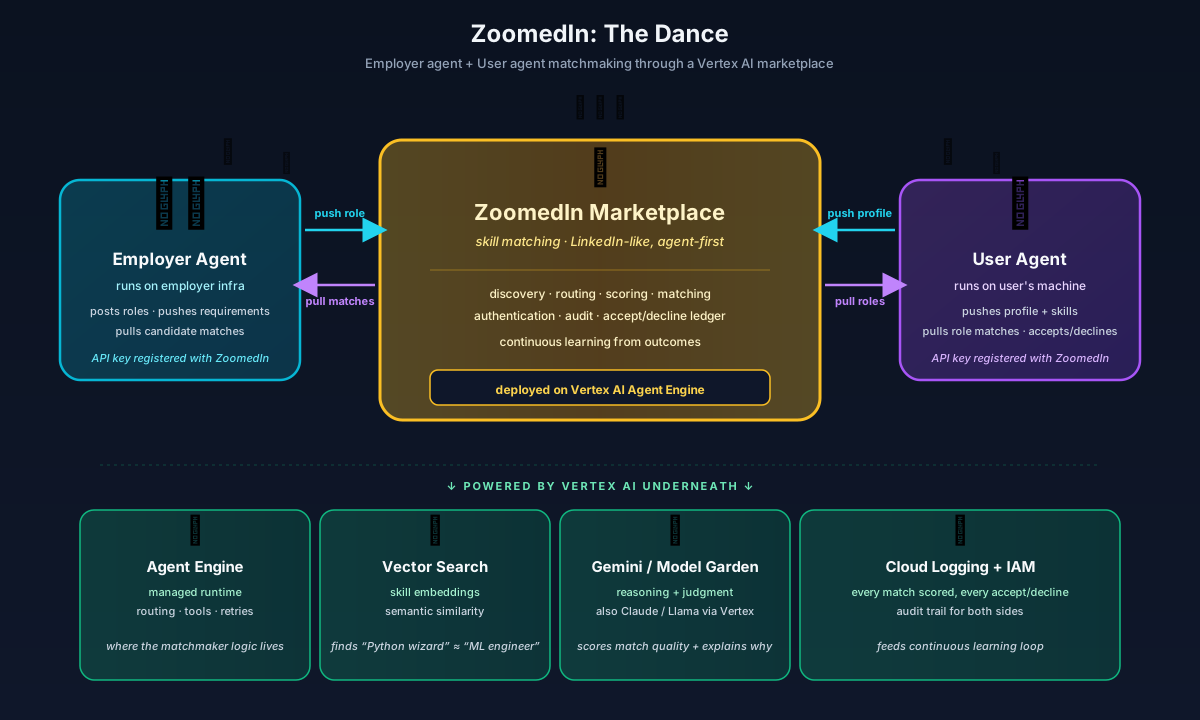
Agent-to-Agent (A2A) — the 6 stages of conversation
How do an employer's agent and a user's agent — running on different machines, owned by different organizations — talk to each other safely? Through the marketplace, with API keys, a discovery step, and a continuous learning loop. This is the A2A protocol:
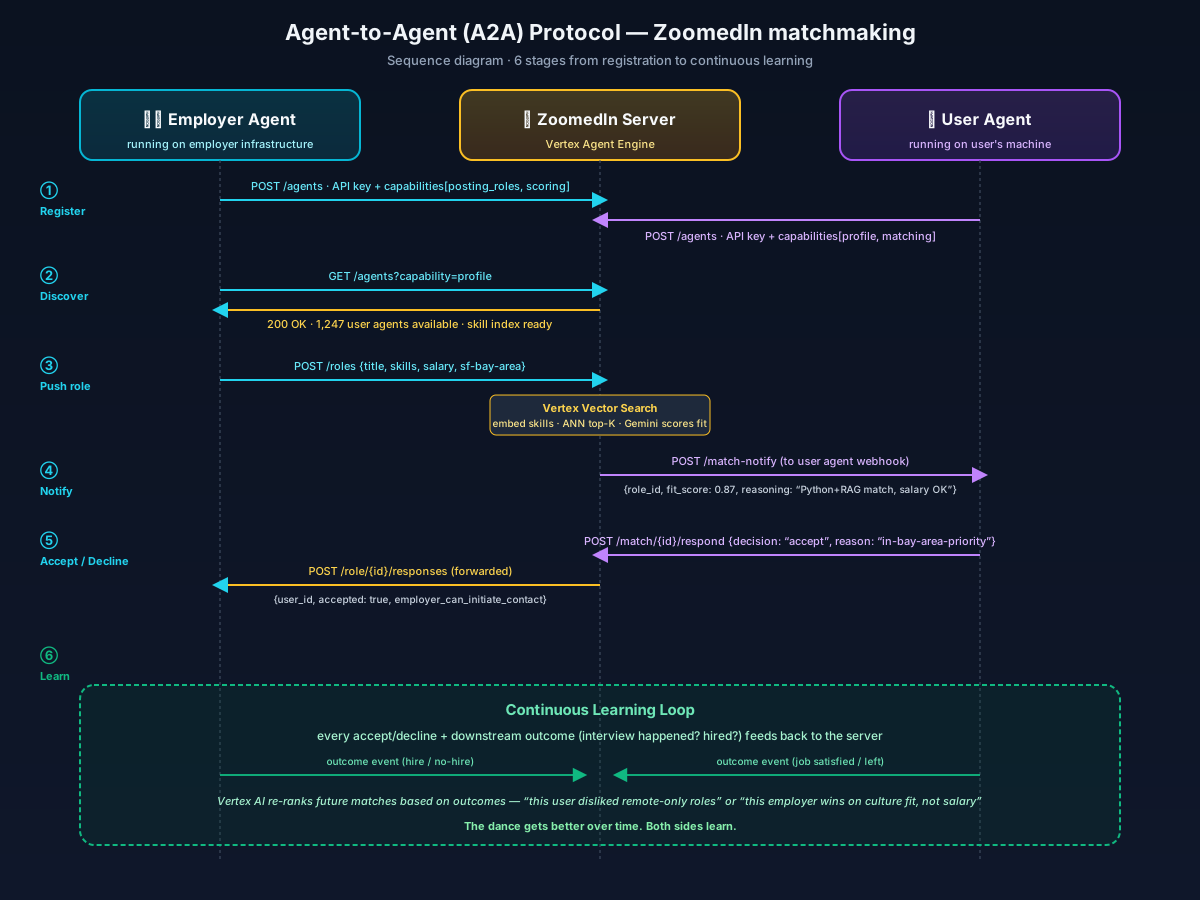
In code, registering an agent and pushing a role looks like this:
# Employer-side agent code (runs on the company's server)
import httpx

ZOOMEDIN = "https://api.zoomedin.us"
API_KEY = os.environ["ZOOMEDIN_EMPLOYER_KEY"]  # issued at signup

# 1.  Register once (idempotent)
httpx.post(f"{ZOOMEDIN}/agents/register", json={
    "type": "employer",
    "capabilities": ["post_roles", "receive_responses"],
    "webhook": "https://acmecorp.example.com/zoomedin-webhook",
}, headers={"Authorization": f"Bearer {API_KEY}"})

# 3.  Push a new role - server scores it against 10M candidate vectors,
#     notifies user agents in milliseconds, sends responses to webhook.
httpx.post(f"{ZOOMEDIN}/roles", json={
    "title": "Senior ML Engineer",
    "skills_required": ["python", "pytorch", "rag", "production-llm"],
    "salary_range": [180000, 240000],
    "location": "sf-bay-area",
    "remote_ok": True,
}, headers={"Authorization": f"Bearer {API_KEY}"})

# 5.  Receive matches via webhook. Decide who to interview.
@app.post("/zoomedin-webhook")
def on_match(event: MatchEvent):
    if event.fit_score >= 0.85 and event.user_accepted:
send_interview_invite(event.user_id)Two modes — vendor-locked vs vendor-agnostic, side-by-side
The same matching logic can be coded two very different ways. Both work. They have different consequences for portability, cost, and regulatory posture.
🔒 Mode A — Locked to Google Gemini
Direct, simple, faster shipping. But the next time you want to swap models, every call site has to change.
from vertexai.generative_models import GenerativeModel

model = GenerativeModel("gemini-2.0-pro")

def explain_match(role, candidate):
    prompt = f"Why does {candidate} fit {role}?"
    resp = model.generate_content(prompt)
    return resp.text
# Every call site hard-codes Gemini.
# Switching providers = rewrite every site.
🔓 Mode B — Vendor-agnostic via Vertex Model Garden
Slightly more code; massively more portable. The provider becomes a config string. The application code never names a vendor.
# Anthropic Claude via Vertex AI:
from anthropic import AnthropicVertex

client = AnthropicVertex(region="us-east5", project_id=PROJECT)

def explain_match(role, candidate):
    msg = client.messages.create(
        model="claude-opus-4@20250514",  # config
        messages=[{"role": "user", "content": f"Why does {candidate} fit {role}?"}],
    )
    return msg.content[0].text
# Same shape works for Llama 3 (Model Garden),
# Gemini, or OpenAI - swap one line.Why vendor-agnostic matters: imagine ZoomedIn signs a federal contract. The contracting officer says: “Your matching algorithm must run a Claude model in a US-East region with FedRAMP coverage, and you must also support Llama 3 for sovereign deployments where Anthropic isn't approved.” In Mode A, this is weeks of refactoring. In Mode B, it's a config change. The architecture, written once, survives every future procurement requirement. See the vendor-agnostic deep-dive for the full routing + policy pattern.
What does “the model learns weights” mean? — the mountain analogy
Almost every AI explainer drops the word weights without defining it. A weight is just a number the model multiplies its inputs by. A small model has thousands of weights; Gemini and Claude have hundreds of billions. Training is the process of nudging every single one of those numbers, a little at a time, so the model's predictions get less wrong on each round of feedback.
The clearest mental picture: imagine standing on top of a foggy mountain. You can't see the valley below — you can only feel the slope under your feet. To get down, you take one tiny step in the steepest downhill direction, then look at your feet again, take another tiny step, and repeat. After thousands of steps you're in the valley. That's gradient descent. The mountain's altitude is how wrong the model is. Each step is a weight update.
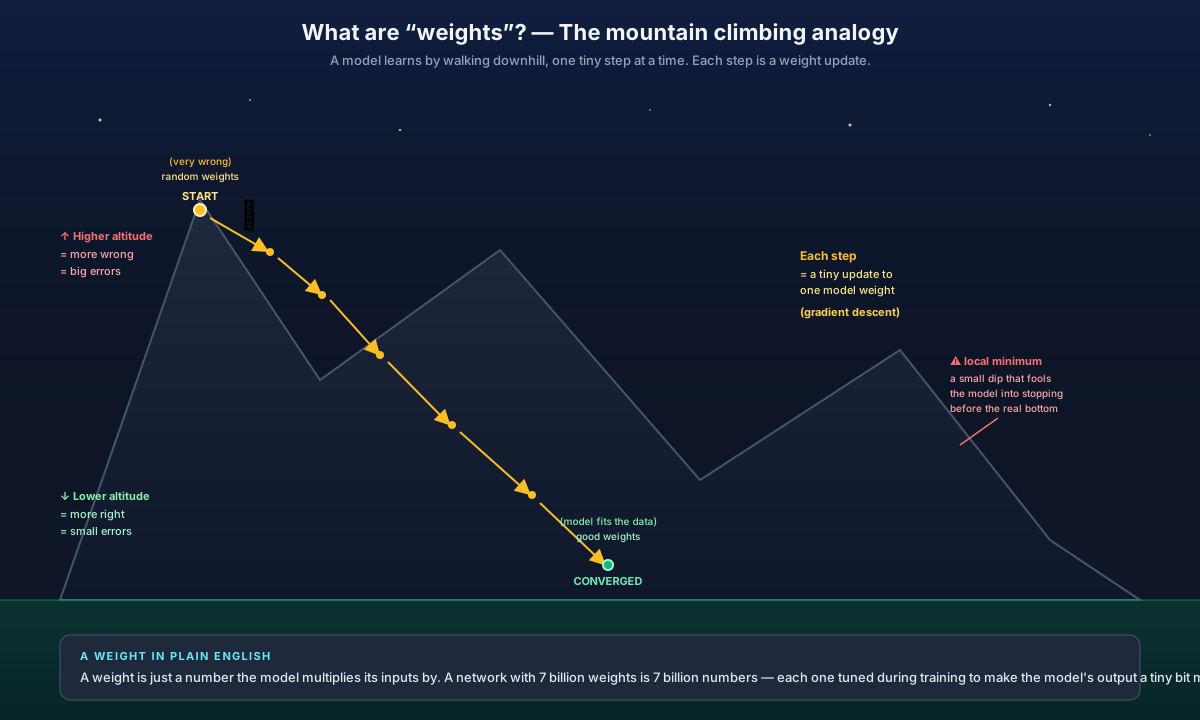
Two nuances that come up in interviews:
- 📉 Local minima — the mountain has small dips that aren't the lowest point. If you stop at a small dip, you've got a mediocre model. Modern optimizers (Adam, AdamW) use momentum + adaptive learning rates to bounce out of small dips and keep walking toward the real valley.
- 🎯 Adversarial / fake-answer training — to make the model robust, you deliberately feed it tricky inputs designed to fool it (a fake job posting that's actually a phishing attempt, a candidate profile that looks great but has plagiarized credentials). When the model gets these wrong during training, the weights update in the direction that catches them next time. This is how matchmaking models learn not to recommend obvious-scam roles.
Where everything runs — the deployment topology
Here's the question that usually comes up next: “OK, I get the API call. But where does it physically run? What do I `git push` to deploy this?” The answer is that Vertex AI is a set of managed services that each accept a specific shape of deployment artifact — your job is to put your code in the right shape and let GCP own the rest.
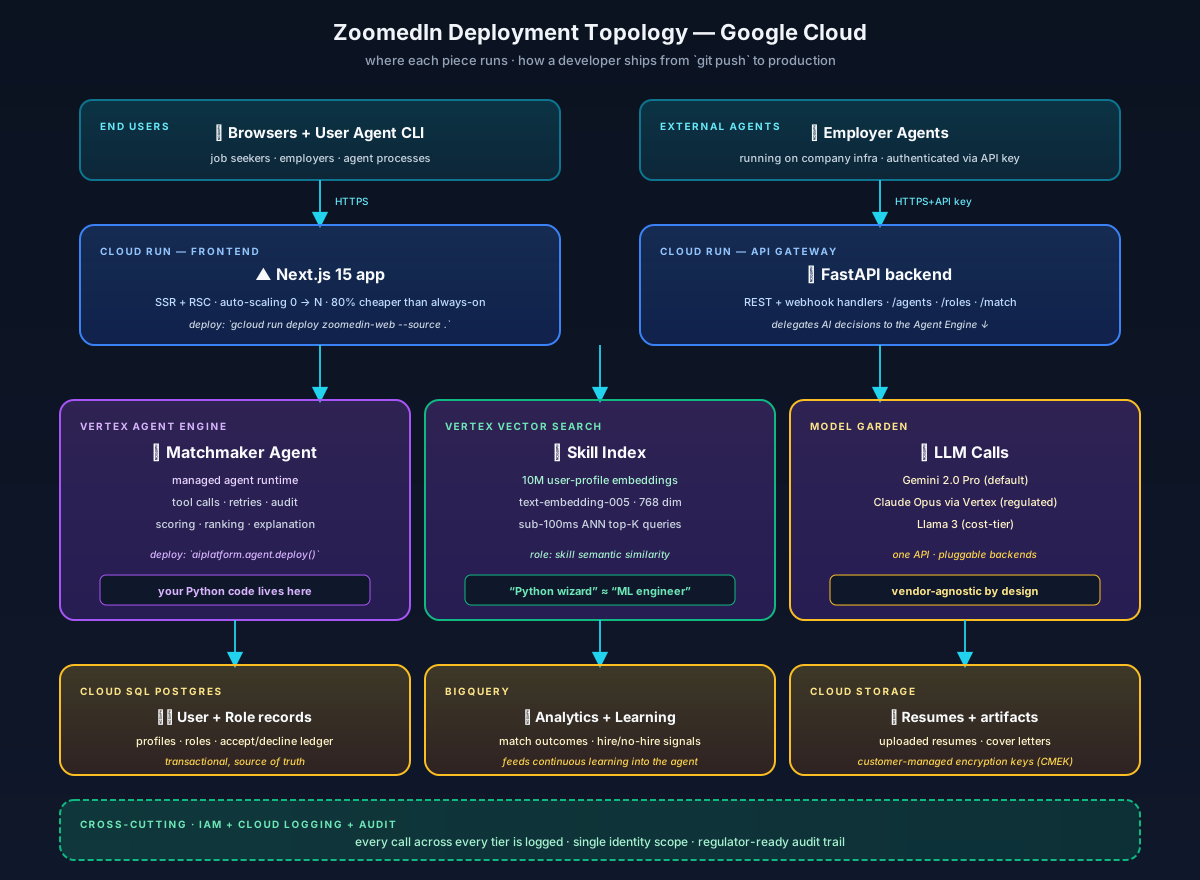
The deploy commands look like this:
# Frontend (Next.js) - Cloud Run, auto-scales to zero
gcloud run deploy zoomedin-web --source . --region us-central1

# Backend (FastAPI) - Cloud Run, same pattern
gcloud run deploy zoomedin-api --source . --region us-central1

# Matchmaker Agent - Vertex AI Reasoning Engine
python -c "
from vertexai.preview import reasoning_engines
reasoning_engines.ReasoningEngine.create(
    reasoning_engine=matchmaker_agent,   # your Python code
    requirements=['google-cloud-aiplatform', 'anthropic[vertex]'],
    display_name='zoomedin-matchmaker',
)
"

# Vector index endpoint (one-time setup - index itself is created
# via 'gcloud ai indexes create' first, then deployed to this endpoint)
gcloud ai index-endpoints create --display-name=zoomedin-skills-ep \
    --region=us-central1 --network=default-network

# Done. The agent has an HTTPS endpoint your backend can POST to.
# Region pinning note: pick ONE region for project init and stick with it -
# Vertex resources are regional, model availability + quotas vary by
# region, and co-locating embeddings + vector search + agent runtime
# + app tier eliminates a class of latency and compliance problems.🎓 The 30-second mental model
Vertex AI is a set of SDK calls. You write Python that imports google-cloud-aiplatform. You call embed(), vector_search(), generate_content(), reasoning_engines.ReasoningEngine.create(). Each call hits a regional HTTPS endpoint that returns the result. Vertex owns the GPUs, the autoscaling, the audit log, the IAM. You own the application logic. Picking Vertex over building it yourself is exactly the trade-off Cloud Run vs running your own Kubernetes is — pay a small premium, skip the infrastructure team.
🛡️ Bonus card — Grounding with Google Search
When someone asks “how do you stop the LLM from hallucinating?” there are two answers Vertex AI gives you that nobody else can:
- Grounding with Google Search — at request time, Gemini on Vertex can attach its answer to fresh results from Google's live search index. The response includes citations to specific URLs. For ZoomedIn, this means a candidate's “fit summary” can reference the company's most recent press release (“hiring 200 ML engineers, just opened Bangalore office”) without you building a custom RAG pipeline.
- Grounding with Vertex AI Search — same mechanism but against YOUR private corpus (uploaded docs, knowledge base) instead of the public web. The no-code RAG path.
from vertexai.generative_models import GenerativeModel, Tool, grounding

model = GenerativeModel("gemini-2.0-pro", tools=[
    Tool.from_google_search_retrieval(grounding.GoogleSearchRetrieval()),
])

resp = model.generate_content(
    "Latest hiring announcements from Stripe relevant to ML engineers in 2026"
)
# resp.candidates[0].grounding_metadata.grounding_chunks
# -> list of source URLs Gemini consulted before answeringPivot move at any interview: if asked about “hallucinations”, the strongest single-sentence answer is “Vertex's native Grounding-with-Google-Search and Grounding-with-Vertex-AI-Search are the two managed remedies — no separate RAG pipeline to build.”
The 10 Vertex AI Components — Plain English
Each component is a managed service that composes with the others. Below: what each one IS, why you NEED it, and how you actually USE it in production. Hover any underlined term for a full definition with examples and vendor links.
Model Garden
The foundation model catalog inside Google Cloud — the "App Store for AI models."
Browse Gemini, Claude, Llama, Imagen, and 100+ open foundation models — all consumable through your Google Cloud project. Same API surface regardless of underlying model vendor.
Without it, every model provider needs its own API key, billing relationship, and security review. Model Garden gives you ONE auth surface, ONE invoice, and ONE compliance posture across every model you consume.
- Browse models filtered by capability (text, vision, embeddings, code)
- Click "Deploy" — Vertex provisions a Vertex Endpoint backed by that model
- Your app POSTs to the regional HTTPS URL — same call shape regardless of which model is behind it
Endpoints
Managed HTTPS serving for any model — autoscaling GPUs/TPUs behind a single URL.
A regional HTTPS URL that runs your model behind autoscaling GPUs or TPUs. POST JSON, get predictions back. Vertex handles the hardware, scaling, replication, A/B traffic splitting, and request logging.
Operating model-serving infrastructure (Triton, vLLM, custom containers on Kubernetes) takes a full SRE team. Endpoints lets a single engineer ship a model to production without owning any infrastructure.
- Pick a model from Model Registry (custom-trained) or Model Garden (foundation)
- Deploy to an Endpoint specifying machine type, GPU/TPU count, autoscale min/max
- Your app POSTs JSON to the regional URL — Endpoints handles failover, load balancing, traffic-split between model versions
Pipelines (Kubeflow on Vertex)
Declarative DAG orchestration for ML workflows — train → evaluate → register → deploy, as a graph.
You define your ML workflow as a DAG (Directed Acyclic Graph) — each step (load data, train, evaluate, deploy) is a containerized Python function decorated with @component. Vertex runs the graph on managed compute with autoscaling, retries, and parallelism. No Kubernetes cluster to manage.
Without it, you write imperative Python that orchestrates training scripts, hopes nothing crashes, and rebuilds the whole pipeline every time the workflow changes. "Declarative" means you describe the GRAPH of steps and their dependencies; the framework figures out execution order, parallelism, retries, and which steps to re-run on failure. That's the entire MLOps reproducibility story.
- Write Python
@componentfunctions for each step (load_data, train_model, evaluate, register) - Define the DAG with
@pipelinethat chains components by their typed inputs/outputs - Submit the pipeline — Vertex runs it, tracks every artifact, and lets you re-run from any failed step without rerunning successful ones
Vector Search
Managed billion-scale ANN — Google's ScaNN algorithm behind a managed service, with sub-100ms query latency.
A managed vector database backed by ScaNN (Scalable Nearest Neighbors), Google's ANN algorithm. Stores billions of embedding vectors and returns the top-K most similar to a query vector in 50-100ms. The migration target for self-hosted pgvector deployments when you outgrow them.
pgvector + HNSW works to ~5M vectors. Beyond that, operational overhead of index management, partitioning, and replica scaling dominates the cost. ScaNN handles 1B+ vectors with managed sharding and autoscaling — same query API, orders of magnitude more capacity.
- Embed your documents using text-embedding-005 (768 dimensions)
- Bulk-upload vectors to a Vector Search index (one-time ingest, plus nightly delta updates)
- At query time: embed the query, POST to the index, get top-K results — typical p99 latency 50-100ms even at 10M+ vectors
Agent Builder
Managed runtime for agentic systems — tool calling, audit trails, governance, all managed.
A managed runtime for agents — low-code visual builder for simpler cases, code-extension via the Reasoning Engine for custom Python agent logic. Built-in tool calling (function calling), audit logging, and unified Google Cloud IAM. Direct alternative to self-hosted LangGraph or CrewAI.
Hosting your own agent runtime (LangGraph on Cloud Run / Kubernetes) means writing custom observability, audit logging, IAM wiring, and deployment automation. Agent Builder gives you those out of the box — critical for regulated industries where every agent decision must be auditable.
- Define the agent's tools as Python functions with type hints (Vertex auto-generates the JSON tool schema)
- Specify the LLM via Model Garden (typically Gemini Pro 1.5+)
- Deploy to a managed Reasoning Engine endpoint — your app calls the agent via REST, Vertex runs the agent loop, tool execution, retries, and audit logging
Training
Managed GPU/TPU training infrastructure — submit a job, get a model artifact back.
On-demand training infrastructure. Submit a job, Vertex provisions GPUs or TPUs, runs your training script, saves the trained model. Supports custom containers, hyperparameter tuning (Vizier-backed Bayesian search), distributed training across many nodes, and AutoML for tabular/vision/NLP when you don't want to write training code at all.
Renting GPUs for training is operationally painful — provisioning, networking, storage mounting, OOM handling, multi-node coordination, checkpoint management. Vertex Training abstracts all of it. You pay only for the wall-clock training time.
- Package your training code in a Docker container (or use Vertex's pre-built PyTorch/TF/JAX containers)
- Submit a CustomJob specifying machine type, region, hyperparameters, dataset URI
- The trained model artifact lands in Cloud Storage and auto-registers to Model Registry
Workbench
Managed JupyterLab with GPUs — "Colab Pro for enterprise."
JupyterLab notebooks running on managed VMs with optional GPUs, idle shutdown, dataset integration (Cloud Storage, BigQuery), and pre-installed PyTorch/TF/JAX stacks. Where data scientists spend their first 80% of work before any of it becomes a Pipeline.
Data scientists need notebooks; running them on laptops is slow and inconsistent. Self-hosted JupyterHub requires DevOps. Workbench gives you one-click notebooks with shared environment and shared dataset access — and shuts itself down when idle to control cost.
- Launch a Workbench instance specifying machine type and GPU
- Mount your project's Cloud Storage buckets and BigQuery datasets — credentials inherited from your GCP IAM
- Iterate on the notebook; when the workflow stabilizes, promote it to a Vertex Pipeline for repeatable runs
Experiments & Metadata
MLOps experiment tracking — every training run, its parameters, metrics, artifacts, and lineage.
Tracks every training run's parameters, metrics, dataset versions, and output artifacts. A lineage graph shows which run produced which model from which data. The managed-services equivalent of MLflow + DVC + a homegrown audit log.
Without tracking, you can't reproduce a model 6 months later, can't compare runs, can't pass audit for regulated industries. Three different problems, one solution: a unified MLOps metadata store.
- Inside your training code, call
aiplatform.start_run()and log params/metrics/artifacts - View all runs in the Experiments UI; compare side-by-side, filter by metric, drill into any artifact's lineage
- For audit: export the full lineage for a specific deployed model — "this prediction came from model v17 trained on dataset v42 with these hyperparameters"
Model Registry
Versioned model store with approval workflows — git for model artifacts.
Versioned model store — every trained model gets a version number, lineage back to its training run, and (optionally) approval gates before deployment. Direct alternative to MLflow Model Registry; integrated with the rest of Vertex by default.
Production model lifecycle needs version control, rollback safety, and audit. Without a registry, you're tracking model files in someone's Drive folder — and when a regulator asks "which model produced this decision in March 2025?", you can't answer.
- Training Pipelines auto-register output models (no manual step required)
- Promote a version through approval workflows (e.g., "dev → staging → prod")
- Endpoints deploys directly from the registry; rollback is one CLI command to the previous version
Feature Store
Online + offline feature serving — single source of truth for features used in training and inference.
A managed feature store with two modes: ONLINE (sub-10ms lookups for inference time) and OFFLINE (batch reads for training). Same feature definitions in both modes — guarantees training/serving consistency.
The #1 silent killer of production ML: feature drift between training pipeline and serving pipeline. Engineers compute "user_7day_purchase_count" one way during training, another way at inference, and the model degrades 10% in production without anyone noticing. Feature Store enforces a single source of truth.
- Define features (e.g.,
user_7day_purchase_count) as transformations on your raw data - Materialize features into both online and offline stores on a schedule
- At training time: batch-read features by entity ID from offline; at inference time: online lookup by entity ID — same definitions, same values, guaranteed
Ecosystem Flow
Data flows from Developer through Pipelines, into managed serving via Endpoints, then branches to Vector Search (for RAG) or Agent Builder (for agentic workflows) before landing in Production. The training loop on the right (Training → Model Registry → Endpoints) is the MLOps lifecycle inside the same managed surface.
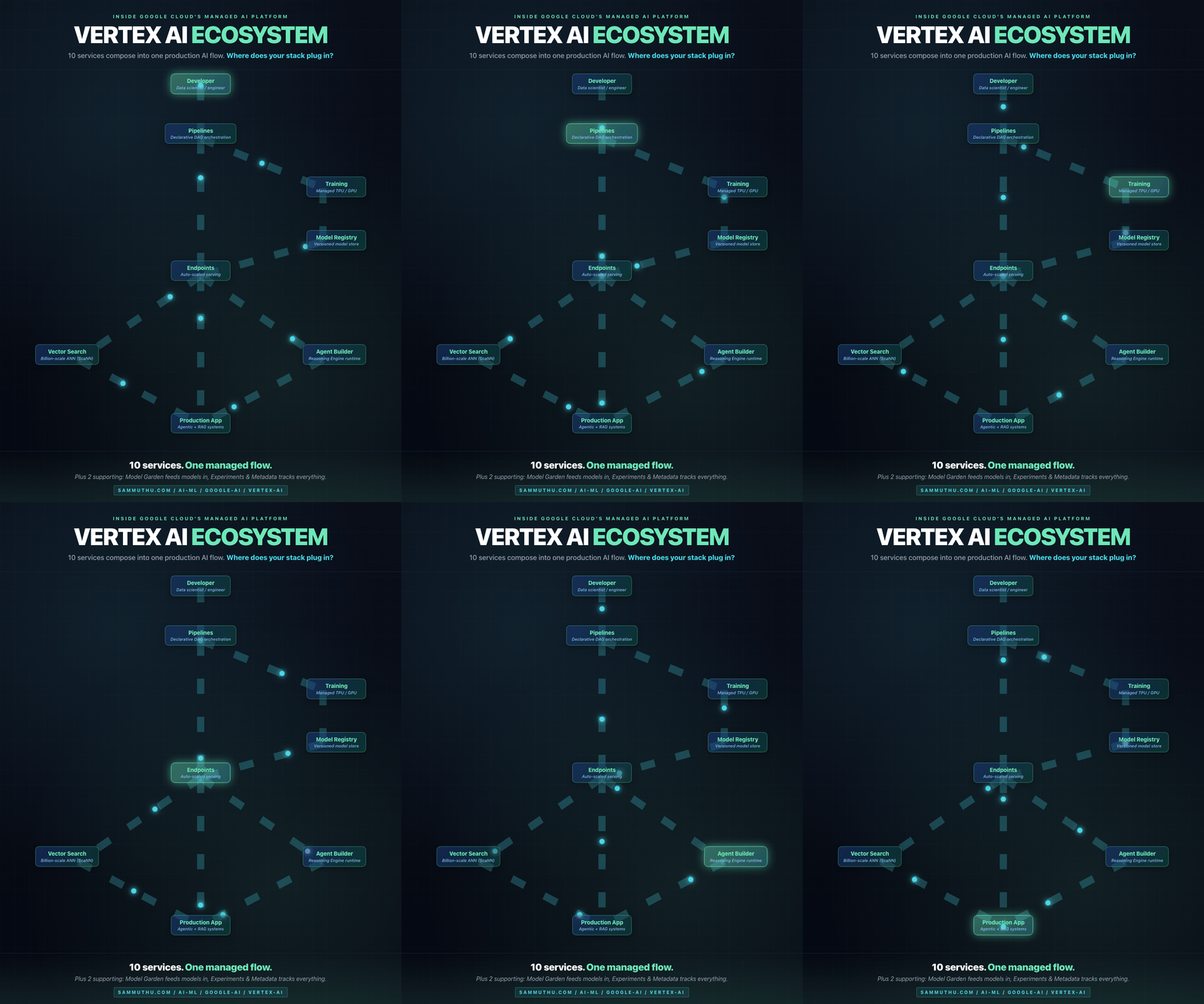
How the Components Compose
Developer / Data Scientist
        |
        v
   [ Workbench ]  <--- iterative experimentation
        |
        v
   [ Pipelines ]  <--- declarative training/inference DAG
        |
        +---> [ Training ]  <--- managed GPU/TPU compute
        |          |
        |          v
        |    [ Model Registry ]  <--- versioned model artifact
        |          |
        |          v
        +---> [ Endpoints ]  <--- managed serving (auto-scale)
                   |
                   +---> tools <---> [ Agent Builder ]
                   |                       |
                   +---> embeddings <---> [ Vector Search ]
                   |
                   v
              Production app / agentic system

   [ Experiments & Metadata ] tracks everything above
   [ Feature Store ] serves precomputed features to Endpoints
   [ Model Garden ] is the catalog from which models flow in
Production Use Cases
Use Case 1 — Enterprise RAG over 50M documents
Problem: A Fortune 500 with 50M internal documents needs "ask anything" search with sub-100ms p99 latency. Self-hosted pgvector + cross-encoder reranking works to ~5M; beyond that, operational overhead of HNSW index management dominates the cost.
Vertex AI architecture: Documents embedded with Gemini text-embedding-005 via a Vertex Pipeline (nightly re-indexing). Vectors stored in Vertex AI Vector Search with 50M-scale index. Query path: embed query → ANN top-100 from Vector Search → rerank with Vertex AI Ranking API → top-5 → Gemini Pro 1.5 (1M context) synthesizes answer with citations. End-to-end p99: 180ms.
Why Vertex wins here: ScaNN — Google's in-house search algorithm — finds substantially more relevant matches than the standard open-source alternatives when you're searching through tens of millions of profiles. The managed Endpoints autoscale to handle traffic spikes. The 1M-token Gemini context window means most queries don't need RAG at all — the corpus fits.
Use Case 2 — Multi-agent customer support triage
Problem: Inbound customer support tickets need: (a) classification by issue type, (b) PII redaction, (c) draft response generation, (d) escalation routing if confidence < threshold. Each ticket touches 4 agents in sequence.
Vertex AI architecture: Vertex AI Agent Builder orchestrates the 4 agents. Each agent is defined as a Reasoning Engine deployment. Tools include: a PII redaction model (custom-deployed to Vertex Endpoints), a classifier (deployed from Model Garden), a Gemini-based draft generator with retrieved past-resolutions as context, and a confidence checker. Agentic workflow runs in < 3 seconds per ticket. All decisions logged to Cloud Logging with full audit trail.
Why Vertex wins here: Agent Builder gives managed observability and audit trails out of the box. The Reasoning Engine is a managed runtime — no Cloud Run / Kubernetes deployment to maintain. Unified IAM means agent permissions map to Google Cloud roles directly.
Use Case 3 — Nightly model retraining with drift detection
Problem: A fraud detection model degrades 2-3% / month due to attacker adaptation. The team needs nightly retraining with: data freshness check, drift detection against the last week, training on TPU, evaluation against held-out test set, automatic A/B rollout if metrics improve.
Vertex AI architecture: Vertex AI Pipelines defines the 7-step DAG (data → drift → train → eval → register → deploy 5% canary → monitor). Cloud Scheduler triggers nightly at 2am. Training runs on TPU v5e. Model Registry versions each output. Endpoints does the canary deployment with traffic splitting. Experiments tracks every metric for compliance audit.
Why Vertex wins here: Pipelines + Experiments + Registry + Endpoints compose into a complete MLOps loop without writing any orchestration glue code. Manual equivalent is Airflow + MLflow + custom canary logic + manual eval — orders of magnitude more code to maintain.
Use Case 4 — Multimodal video understanding pipeline
Problem: A media company has 100,000 hours of video archive. Need to: extract scenes, transcribe audio, identify objects/people, generate searchable metadata for each 30-second segment.
Vertex AI architecture: Vertex Pipelines orchestrates batch inference. Each video chunked into 30-second segments. Each segment passes through Gemini 2.0 Pro via Vertex Endpoint — multimodal call returns: scene description, transcription, object list, summary. Outputs embedded with text-embedding-005 and indexed in Vector Search. All metadata written to BigQuery for SQL analysis.
Why Vertex wins here: Gemini's native multimodality means one model call per segment instead of 4 (scene detection + transcription + object detection + summary). The 1M-token context window means even hour-long segments can be processed without chunking. Pipelines + Endpoints + BigQuery integrate natively.
When Vertex AI Wins (and When It Doesn't)
✅ Vertex AI wins when
- •You're already on Google Cloud — billing, IAM, networking are unified.
- •You need Gemini at scale — native via Model Garden, not via reverse-proxied API.
- •You've outgrown pgvector — 10M+ vectors with p99 latency requirements.
- •You need managed MLOps — Experiments + Registry + Endpoints out of the box.
- •You're in a regulated industry — Vertex inherits Google Cloud's compliance posture (SOC 2, HIPAA, FedRAMP).
- •Multi-team consumption — shared Endpoints, shared Feature Store, unified observability.
⚠️ Vertex AI is overkill when
- •You're at early-stage scale — < 1M daily inferences. Direct API calls are cheaper.
- •You're cloud-agnostic by requirement — multi-cloud architectures want the abstraction layer in your own code, not the cloud provider's.
- •Your team is < 5 people — operational simplicity of pgvector + FastAPI + direct API is hard to beat.
- •You need bleeding-edge model access — direct OpenAI / Anthropic APIs ship features faster than Vertex Model Garden mirrors them.
- •Cost is the dominant constraint — Vertex Endpoints add ~20% premium over equivalent self-hosted serving.
How I Architect for Vertex AI
My production stack at Zen Algorithms runs on direct APIs for budget reasons — but every component is architected with Vertex AI as the managed scale-out path.
The LLM Council pattern uses Gemini via direct API today; the same pattern is portable to Vertex AI Endpoints with no logic changes — just swap the model client. The AI Factory three-layer framework runs on ThreadPoolExecutor for local dev; the same orchestration semantics map directly to Vertex AI Pipelines for production scale-out.
For RAG, I deploy with pgvector in early-stage budget tier and document the migration path to Vertex AI Vector Search at scale. The 15-step production RAG anatomy I've published is vector-DB agnostic by design — every stage (chunking, embedding, hybrid search, re-ranking) works over Vector Search the same way it works over pgvector.
The architectural discipline that carries from Wells Fargo SIMS (5 years under SOX and PCI-DSS) to Vertex AI: every model decision needs to be reconstructible. Vertex AI Experiments + Model Registry are the managed equivalents of what we built manually at WF — version prompts, version models, version retrieval pipelines, log every decision input and output. AI governance for regulated industries isn't a layer on top; it's designed into the architecture from day one.
Glossary
Hover any underlined term anywhere on this page for the full definition.
Related Reading
- Gemini — multimodal frontier model deep dive
- Vertex AI Vector Search — managed billion-scale ANN
- Vertex AI Agent Builder — managed agent platform
- Vertex AI Pipelines — Kubeflow on Vertex
- Enterprise RAG Anatomy — 15-step production pipeline
- Model Committee — routing patterns including Vertex AI Model Garden
- AI Factory — three-layer framework portable to Vertex Pipelines