Flowise — what it is, who it's for, and what I learned building with it
Flowise is an open-source, low-code visual builder for LLM apps and agent workflows. You drag boxes onto a canvas, connect them with arrows, and you have a working chatbot or agent — no code needed. Built on LangChain.js and ReactFlow. Acquired by Workday in late 2025 to become the foundation of their enterprise AI agent platform.
🧩What is Flowise?
Flowise is a visual builder. Instead of writing JavaScript or Python to wire an LLM to a vector database to a tool to a memory store, you drag those components onto a canvas and connect them with arrows. The runtime interprets the canvas, instantiates the LangChain.js primitives, wires them up, and runs the flow when a user sends a message.
Each “box” on the canvas is a node — a wrapped LangChain.js primitive (a chat model, a retriever, a tool, an agent). Each arrow is an edge — a typed data flow from one node's output to another node's input. The whole graph is saved as JSON and stored in a database row, which means flows are versionable, exportable, and inspectable like any other piece of structured data.
Flowise comes in three editions — open source (free, self-hosted, single-tenant), enterprise (paid, self-hosted, with multi-tenancy and SSO), and cloud (paid, hosted by the Flowise team, now part of Workday).
👤How a regular user uses Flowise
The “regular user” here is anyone building an AI app for themselves or a small team — a developer prototyping ideas, a startup shipping their first chatbot, a consultant putting together a quick demo. They install Flowise locally (Docker is the cleanest path), open localhost:3000 in a browser, and start dragging.
A typical first flow:
- Add a Chat Model node (Claude, GPT, Gemini, etc.) and paste an API key
- Add a Conversation Chain to wrap the model with message-handling and memory
- Add a Buffer Memory so the bot remembers prior turns in the same session
- Wire the three together, save, click the chat icon, and start chatting
Past the hello-world flow, regular users add RAG over their own documents (drop PDFs into a Document Store, pick an embedding model, plug in a vector database), then add tools (call internal APIs, query databases, run calculations), and eventually graduate to agent flows where the LLM decides which tool to call instead of following a fixed pipeline.
For this audience, Flowise replaces what would otherwise be a few hundred lines of TypeScript glue code. That glue is genuinely useful to skip — wiring LangChain primitives manually is repetitive, and the visual canvas makes the architecture self-documenting.
🏢How an enterprise uses Flowise
Enterprise use is a different shape. A single Flowise instance serves thousands of customer organizations, with strong isolation between them. The hierarchy is Organization → Workspace → User:
- An Organization is one customer company (e.g., a bank with 50,000 employees)
- A Workspace is a team or department within that organization (HR, IT, Finance)
- A User is an individual employee with a specific role (admin, builder, viewer)
Flows are scoped to workspaces. Sarah from Acme's HR team can build and edit chatflows in the Acme HR workspace, but she can't see flows in Acme's IT workspace, and she certainly can't see flows from Beta Corp (a different organization on the same Flowise instance). The data isolation is enforced at the database layer — every ChatFlow row carries a non-null workspaceId column that scopes every query.
On top of that hierarchy, the enterprise tier adds:
- SSO — employees log in with their existing corporate identity (Azure AD, Okta, Google Workspace, etc.)
- RBAC — fine-grained role-based access control over who can build vs. view vs. admin
- Audit logs — who did what, when, with full traceability
- Usage metering & billing — track tokens and cost per workspace for chargeback
- License-gated features — runtime checks that enable enterprise-only capabilities
This is the layer Workday is building out. Their customer base — HR Directors, Finance Leaders — needs the multi-tenant isolation, the SSO into existing Workday identity, the audit trail for compliance. The enterprise edition is what makes Flowise viable as “the AI agent platform inside Workday,” not just “a clever OSS prototype builder.”
🔬My deep dive — May 2026
The sections below are my personal hands-on observations from spending a focused day with Flowise: cloning the codebase, running it locally on a non-default port, building a working chatflow from scratch, and inspecting the SQLite database in real time as the UI wrote to it. I wanted to form a genuine technical opinion — not a marketing-aware one — so I went a layer deeper than “tutorial walkthrough.”
Captured 2026-05-10. The codebase moves fast; specifics noted here may have shifted by the time you read this.
🛠️Setup — what I did, and what surprised me
The install path took four attempts. The friction surprised me — I expected a one-line install given Flowise's polish elsewhere. Worth documenting because new users hit the same wall.
npx -y flowise startnpm install -g flowisepnpm dlx flowise startdocker run -d -p 3050:3000 -v ~/.flowise:/root/.flowise flowiseai/flowisePort mapping — small detail that mattered
My Mac's port 3000 is taken by another service. Flowise's container hardcodes port 3000 internally, but Docker's -p 3050:3000 flag let me expose it on host-port 3050 without touching the Flowise code. The container thinks it's on 3000; my browser thinks it's on 3050. Standard pattern, but worth calling out for new users — many tutorials assume port 3000 is available.
🔍Reading the codebase before clicking the UI
Before opening the visual builder, I cloned the repo and walked the architecture. Six observations stood out.
1. Six top-level packages (not the three you'd expect)
agentflow, api-documentation, components, observe, server, ui. The observe package being a first-class peer was unexpected. Most AI tooling treats observability as bolt-on. Flowise treats it as core. That's a strong signal about the team's production-mindedness.
2. Enterprise lives inside the OSS repo, with its own license
The packages/server/src/enterprise/ subdirectory holds RBAC, SSO, and additional controllers/services with a separate LICENSE.md. This is the OSS-vs-enterprise divergence pattern: single repo, single build, license-as-boundary. Pragmatic — fast iteration, transparent to the OSS community, no cross-repo sync. The architectural risk is that the boundary lives in import statements rather than package boundaries. As the team grows past 10 engineers, an ESLint rule preventing OSS code from importing enterprise/ modules would be the natural guard.
3. Multi-tenancy is baked into the core entity
Every ChatFlow row is workspace-scoped at the data layer:
// packages/server/src/database/entities/ChatFlow.ts:74
@Column({ nullable: false, type: 'text' })
workspaceId: string
Smart decision — OSS users get a multi-tenant-ready data model from day one, and enterprise just adds the Org → Workspace → User hierarchy on top.
4. Multi-tenant scoping is enforced manually at the controller layer
Every controller pulls org and workspace IDs from the request and explicitly passes them to services. Clean and auditable, but manual. As the surface grows, a missed pass becomes a cross-tenant data leak.
The pattern I'd reach for here is AsyncLocalStorage-based context — store the active workspaceId in request-scoped context, and have ORM repositories automatically inject it as a query filter. This eliminates an entire class of cross-tenant bugs by construction. We used this pattern at Wells Fargo on the Secure Identity Management team for customer_id scoping under SOX compliance — it paid for itself within a quarter.
5. Three-tier platform model with RS256 license verification
Platform.OPEN_SOURCE, Platform.ENTERPRISE, Platform.CLOUD — distinguished at runtime via the IdentityManager singleton. License is verified via RS256 JWT with a public key bundled at enterprise/license/public.pem. Clean separation — runtime checks gate enterprise features, license signature is verifiable without phoning home.
6. SSO has four providers — but no native Workday SSO yet
The codebase has ['azure', 'google', 'auth0', 'github'] wired up. Workday-native SSO is conspicuously absent. Workday's enterprise customers will expect to log into Flowise with their existing Workday identity. The SSOBase abstraction is already in place — adding Workday-native SSO is implementing one more subclass. This feels like the most obvious “first integration to build” once Workday rolls Flowise out to its enterprise base.
🛠️Building my first chatflow
After the architectural read, I went to the UI and built the simplest valid chatflow: Anthropic Claude as the chat model, a Conversation Chain to wrap it with message-handling, and Buffer Memory to store conversation history. Three nodes, two wires.
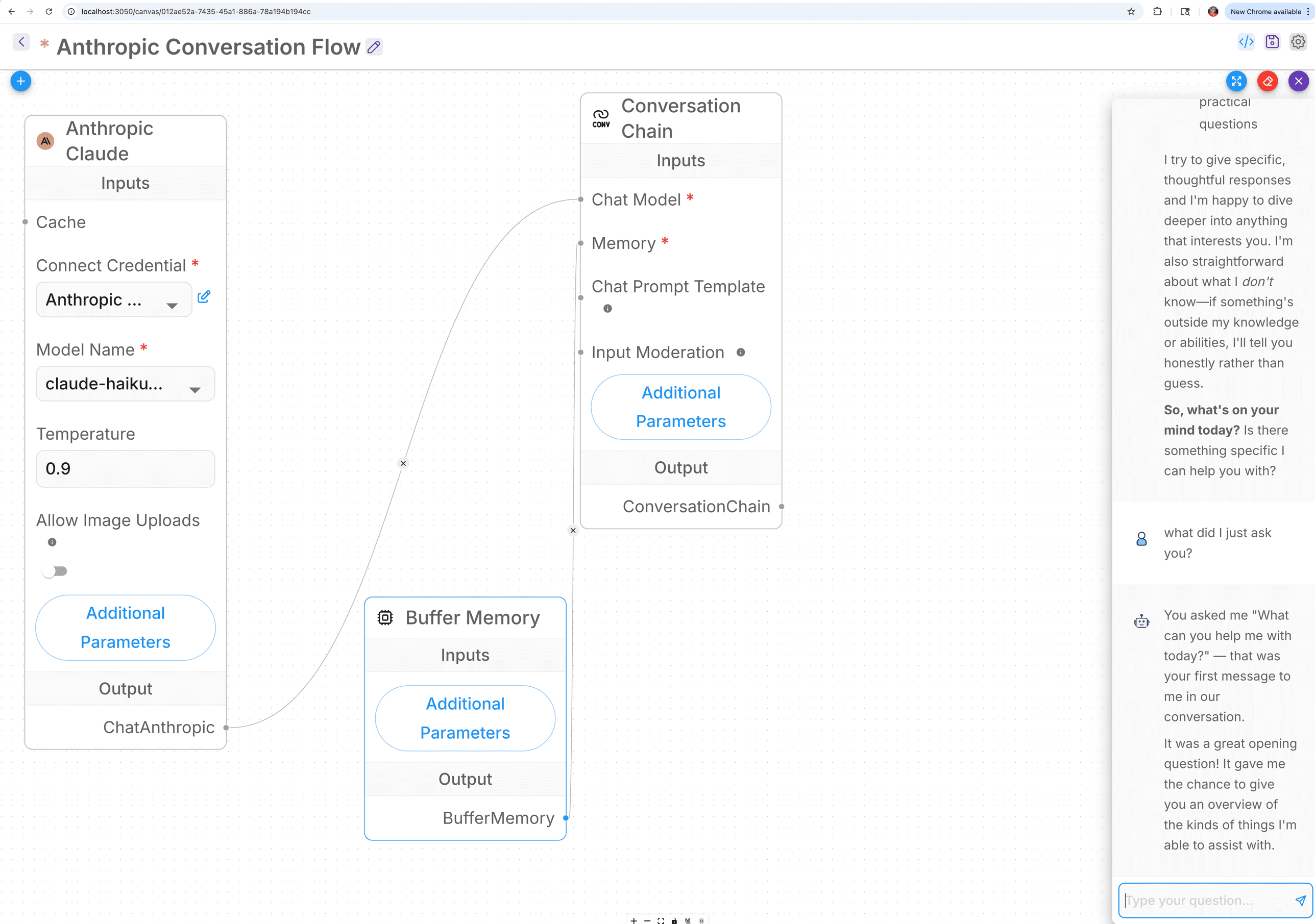
The flow shape
Three nodes wired as:
Anthropic Claude  ──output──▶  Conversation Chain  (Chat Model input)
Buffer Memory     ──output──▶  Conversation Chain  (Memory input)
                                        │
                                        ▼
                              Streaming response back to user
What worked well
- ✓ The node palette is well-organized — 25 categories of nodes, sensible naming, useful descriptions
- ✓ The visual canvas is responsive — zoom, pan, drag all feel solid
- ✓ The credential management dialog is thoughtful — encrypt-at-rest, never expose the key after save
- ✓ Live streaming via Server-Sent Events — production-grade, not bolted on
- ✓ First-time chat worked first try — no environment debugging, no config drift
What surprised me as a first-time user
- ⚠ Two required inputs for the simplest possible chat: the Conversation Chain requires both Chat Model AND Memory even for a hello-world test. A “SimpleChatFlow” primitive without required Memory would lower first-flow time from 10 minutes to 2.
- ⚠ Socket dot colors confused me: dots change between blue and grey, which I initially read as input/output color coding. Turns out it's selection state. Worth clarifying in the docs that POSITION (left vs right) determines direction, not color.
- ⚠ No “Hello World” template: the marketplace has dozens of templates but none labeled “Simplest possible chat.” A first-flow template would meaningfully improve onboarding.
- ⚠ The complexity is real: even a Hello-LLM flow requires understanding LLM credentials, model selection, conversation chains, memory primitives. That's not a Flowise problem — that's the actual underlying complexity of LLM apps. But for non-technical users (Workday's HR Director persona), opinionated default templates would be the bridge.
🗄️Watching the database while I clicked
One thing I always do when learning a new platform is connect to the running database and watch it change as I use the UI. It's the fastest way to internalize the data model. I opened Flowise's SQLite database (default at ~/.flowise/database.sqlite) directly in IntelliJ while the container kept running — SQLite supports concurrent readers.
Here's what gets written when. Each UI action maps to specific table writes:
One row inserted. The flowData column holds the entire graph as a JSON string — nodes array (each with id, type, position, config), edges array (source, target, sourceHandle, targetHandle). The text column choice is pragmatic for SQLite/Postgres compatibility.
id          uuid
name        varchar
flowData    text          ◄── JSON of the graph
deployed    boolean
isPublic    boolean
type        varchar       ◄── CHATFLOW | AGENTFLOW | MULTIAGENT | ASSISTANT
workspaceId text NOT NULL ◄── multi-tenant scoping
createdDate timestamp
updatedDate timestamp
One row inserted with the credential name, type, and encryptedData. The raw API key is encrypted at rest using a key derived from FLOWISE_SECRETKEY_OVERWRITE env var. After save, even an admin can't read the raw value back from the UI — they can only delete or replace it.
Two rows inserted per turn: one for the user message (role: 'user') and one for the assistant response (role: 'apiMessage'). Each row carries chatId for grouping the session, chatflowid for which flow handled it, and content for the message body.
One row tracking the full execution — start time, end time, status, which nodes ran, any errors. This is what powers the Executions tab in the UI. For audit/compliance use cases, this is the table you'd query to answer 'who asked what, when, and what did the bot answer.'
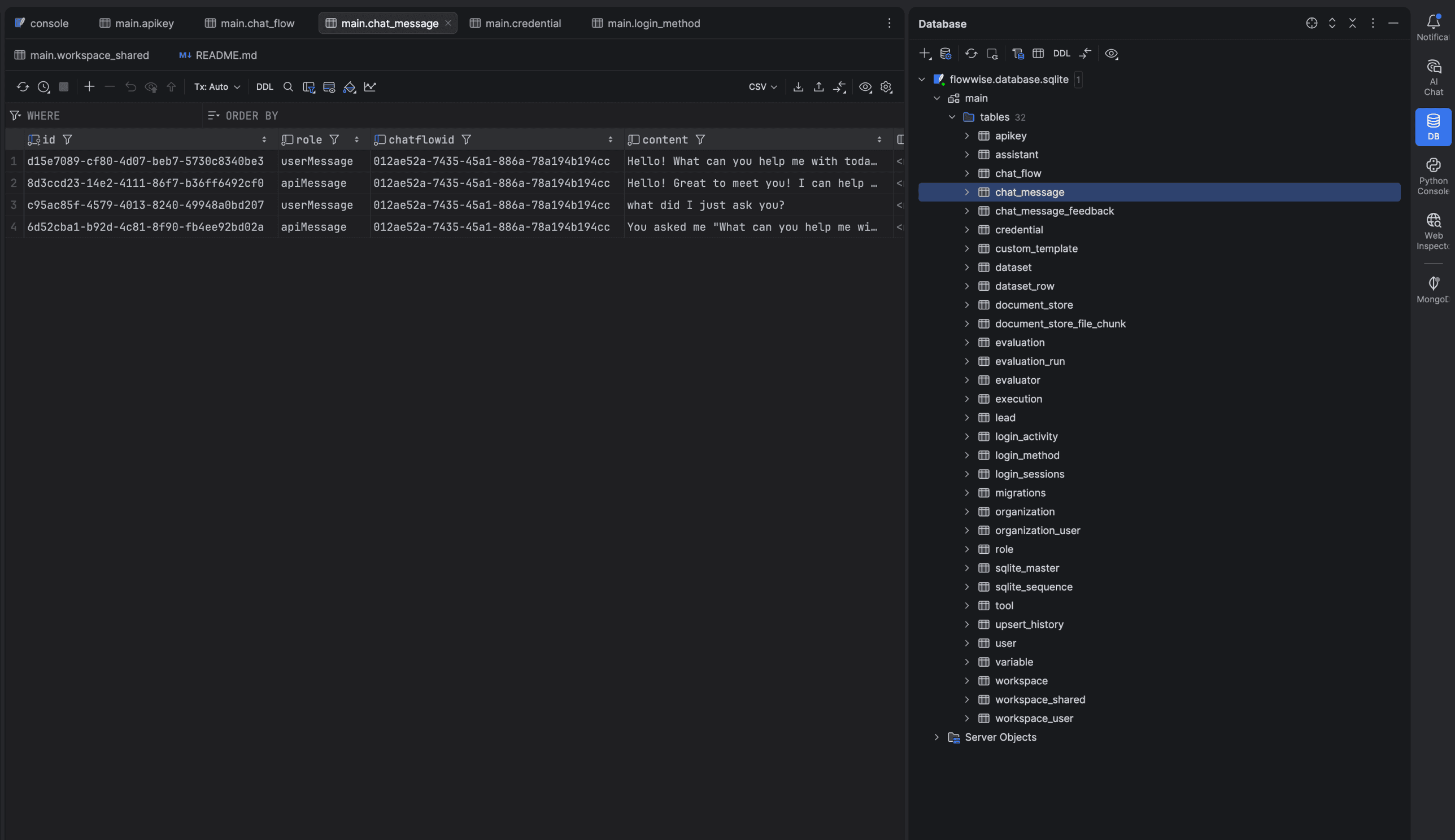
~/.flowise/database.sqlite while the Flowise container kept running (SQLite supports concurrent readers). On the right, the full schema — 32 tables. On the left, the chat_message table showing my actual conversation: two userMessage rows interleaved with two apiMessage replies, all sharing the same chatflowid. Memory test passes at the database layer, not just in the UI — proof that Buffer Memory is doing real work.🎯What Flowise abstracts — and what it doesn't
You don't write JavaScript glue between LLM, retriever, vector store, tool, memory. You drag arrows. That's real value.
You still pick:
- ◆ Which embedding model (
text-embedding-3-largevs voyage-3 vs BGE — different choices for HR docs vs code vs security ops) - ◆ Which vector database (pgvector for transactional colocation, Pinecone for managed scale, Chroma for in-process)
- ◆ How to scope multi-tenant data access
- ◆ How to encrypt and rotate credentials (static secret vs envelope encryption with KMS)
- ◆ How to evaluate flow quality before promotion to production
- ◆ How to handle long-running flows that exceed request timeouts
- ◆ How to attribute cost across tenants
Flowise gives those decisions PLACES to live (Document Stores, Credentials, Variables, Evaluators, Custom MCP Servers). It does not REMOVE the decisions. For a developer-led customer adoption, this is fine — the developer makes the calls. For Workday's go-to-market — HR Directors and Finance Leaders, not engineers — the missing layer is opinionated defaults: a “Workday HR Starter” template that picks the right embedding for policy docs, the right vector DB tier for company size, the right SSO integration. The customer doesn't make 30 infrastructure decisions; they get a working agent in 10 minutes, then customize from there. That's the bridge between “beautiful low-code platform” and “tool a Workday customer's HR Director can use without an engineer.”
🚀If I were on the team — six things I'd evolve first
None of these are rewrites. They're evolution-from-current-state opportunities. The architecture Flowise has built is sound — the next layer is making it work for the audience Workday is taking it to.
1. Workday-native SSO provider
The SSOBase abstraction is already there. Adding Workday SSO is one more subclass. Customer-expected, low risk, high “we're integrated” signal. ~1-2 weeks.
2. AsyncLocalStorage tenant scoping
Move the controller-layer manual workspaceId passing into a request-scoped context that ORM repositories auto-inject. Eliminates cross-tenant leak bugs by construction. ~2-3 weeks.
3. KMS-based credential envelope encryption
Replace the static FLOWISE_SECRETKEY_OVERWRITE env var with envelope encryption — each credential encrypted with a unique data key, the data key encrypted with a customer-controlled KMS master key. Rotation becomes a metadata change. ~1-2 weeks.
4. ChatFlowVersion entity for production rollback
Snapshot ChatFlow.flowData on every save into a versioned history. Enable diff, rollback, and traffic-splitting between versions for canary rollout. ~3-4 weeks.
5. Workday HR / Finance Starter Templates
The opinionated-defaults layer that turns Flowise into a tool a non-engineer can use. Pre-configured for parental leave Q&A, expense report routing, PTO policy, onboarding chatbot. Customers clone, configure their domain-specific docs, deploy. Ongoing roadmap.
6. Eval-as-promotion-gate
The Evaluation entity already exists in the schema. Make running an Evaluator against a golden dataset a required step before flow promotion to production. Block promotion if quality drops below threshold.
🌅Closing thoughts
Most acquisitions of OSS projects either feel stewarded (community grows) or co-opted (community forks). The difference is communication, code transparency, and whether the maintainer team continues to ship to the OSS branch first, enterprise second. From the codebase, the Flowise team has done this right — enterprise extensions live transparently in the OSS repo with a clear license boundary, and the OSS-facing primitives haven't been gutted to push customers toward paid features.
For a team building enterprise AI infrastructure, the Flowise codebase is genuine engineering work — not marketing dressed up as a product. The next chapter is the OSS-to-enterprise bridge that makes it work for Workday's specific customer base (HR Directors, Finance Leaders, not engineers). That's a problem worth working on.
📚Where this series goes next
This is the first post in a series I'll keep adding to as I build more flows in Flowise. Planned next:
- Building a RAG flow over HR policy docs — document loader, text splitter, embeddings, vector store, retriever, conversational retrieval QA chain. The 8-node pattern that powers most enterprise document Q&A.
- An agentflow with tool calling — the LangGraph-style runtime for multi-step reasoning agents. Let an LLM decide which tool to call.
- Connecting Flowise to MCP servers — the integration story for standardized tool surfaces.
- Multi-tenant deployment patterns — what enterprise Flowise on Workday will look like at scale.